With the
Azure AD Conditional
Access feature, rules for access to Microsoft Cloud Services and other apps
registered in Azure AD can be bound to conditions.
An example
is the rule: When accessing with an unmanaged device, the user is prompted
to use multi-factor authentication.
With the
feature "Use Conditional Access App Control" as an option in the
Session Controls area within Azure AD Conditional
Access, advanced scenarios can be setup.
Options:
Prevent
data exfiltration
Protect
on download
Prevent
upload of unlabeled files
Block
potential malware
Monitor
user sessions for compliance
Block
access
Block
custom activities
Example:
Automatically
assign a sensitivity label when a file is downloaded.
Filter
based on regular expressions: “Include Files that match a custom expression”
Block
Upload if Maleware is detected.
This is can be done because the Cloud
App Security service then acts as a proxy for accessing the application:
To register
an app, the wizard can be used in Cloud App Security via Investigate ->
Connected Apps -> Conditional Access App Control Apps. Another and much
simpler way is to use a conditional access policy as an easy start:
Azure
AD Security -> Conditional Access
New
Policy
Section
„Access controls“ -> „Session“
Use
„Use Conditional Access App Control“
Use
„Use custom policy to set an advanced policy in Cloud App Security“
Configure
the policy in the menus "Users and Groups" etc. that it will be
applied the next time the app to be registered is started. This then results in
apps that are authenticated via Azure AD being automatically registered in
Cloud App Security under „Conditional Access App Control“:
The above
method works for the so called featured
apps. In order to make this option work for the Office
365 Featured Apps, Office 365 must be registered under "Connected
Apps" in Cloud App Security:
Once an app
is registered, session policies can be created that will take effect when the
app is used.
Example: If the user Oliver Hardy tries to download a
document from Microsoft Teams (SharePoint) that contains the term
"confidential", the download is blocked.
Further scenarios
Monitor / block activities based on file conditions like Classification Label, File Name, Files Size or File Extension
When
opening the app, the user is notified that access is monitored by Cloud App
Security. The fact that a proxy is involved can also be recognized by the URL.
This now has the addition access-control.cas.ms:
If the user
Oliver Hardy now tries to download a document he gets the following message:
Since
several month the new unified labeling feature in Office 365 is available. We
can easily migration AIP labels from Azure to unified labeling in Office 365. For
more details and a step-by-step guide see here: LINK
Since unified labels are rollout out Microsoft
is in the middle of its journey to “Microsoft Information Protection”. This new
solution combines Azure Information Protection and Labels in Office 365. It
integrates DLP features and even new capabilities like “Site and group settings”
focusing to Office 365 Groups / Teams and SharePoint:
And
also other new feature like auto-classification with sensitivity Labels in SharePoint
Online and OneDrive for Business which is a separate preview:
This new
feature includes a Policy Simulation to test a policy bevor it is deployed in
your Office 365 Tenant.
Selecting
the policy opens the overview containing the Policy Simulation results
Deprecation of AIP Classic
client and Label Management in Azure portal
Microsoft
announced the deprecation of label management in Azure portal and AIP classic
client: http://aka.ms/aipclassicsunset
What does
it mean for you?
Label
management in Azure portal will not be supported after March 31, 2021.
Customers
should activate unified labeling and move to Microsoft 365 Security and
Compliance Center.
AIP
Classic client will not be supported after March 31, 2021.
Customers
should use the built-in labeling in Office ProPlus as the preferred option or
upgrade to AIP Unified Labeling Client. More Information about built-in
sensitivity labels support in Office ProPlus here: LINK
Features not planned to be
in the Azure Information Protection unified labeling client
Azure
Information Protection unified labeling client is still under development, the
following features from the classic client will not be available in future
releases for the unified labeling client:
Custom
permissions as a separate option that users can select in Office apps: Word,
Excel, and PowerPoint
Track
and revoke from Office apps and File Explorer
Information
Protection bar title and tooltip
Protection-only
mode (no labels) using templates
Protect
PDF document as .ppdf format
Display
the Do Not Forward button in Outlook
Demo
policy
Justification
for removing protection
Confirmation
prompt Do you want to delete this label? for users when you don't use the
policy setting for justification
Separate
PowerShell cmdlets to connect to a Rights Management service
Features
that Microsoft do not plan to ship for Unified Labeling are deprecated from
March 31, 2021.
What should customers do
if they use an AIP features that will not be available in Unified Labeling?
If a
customer is using or waiting for features that are planned to ship like HYOK,
Track and Revoke, Event Log for AIP Client etc. These customers can file a File for extended support. The form allows customers to ask
for extended support. Details:
Customer
must specify the reason for extended support and provide Microsoft with number
of impacted users.
Customer
must activate unified labeling before 3/31/2020 to be able to ask for extended
support.
Customer must file the request for extended
support before 3/31/2020.
When to use what – Azure Sentinel,
CASB, Azure Security Center, Security & Compliance Center in Office 365,
etc.
Many
customers using Microsoft Cloud Services in the context of collaboration und
communication often asked the “When to use what” question. Meanwhile we had
several really good methods and tools to answer this question like the Periodic Table of Office 365. At the end it is not about when to use what,
it is about “what do you want to do” or “what is your business case”? And this
is the same with the Microsoft Security Features & Services.
Microsoft
Cloud App Security is a multimode Cloud Access Security Broker (CASB). It
provides rich visibility, control over data travel, and sophisticated analytics
to identify and combat cyberthreats across all your cloud services. Further
infos about CASB
Office
365 Security & Compliance Center is designed to manage security & compliance
features across Office 365. Links to existing SharePoint and Exchange
compliance features bring together compliance capabilities across Office 365.
Microsoft
Intune is a management solution that provides mobile device, endpoint and operating
system management. It aims to provide Unified Endpoint Management for corporate
devices and BYOD.
Azure
Active Directory (Azure AD) is Microsoft’s cloud-based identity and access
management service. It covers resources, such as Microsoft Office 365, the
Azure portal, and thousands of other SaaS applications along with any cloud
apps developed by your own organization.
Microsoft
Information Protection helps an organization to classify and protect its
documents and emails by applying labels. It helps you discover, classify, label
and protect your sensitive information – wherever it lives or travels. Further
infos about Information
Protection
Protect
your enterprise from threats in the cloud and on-premises with Azure Advanced
Threat Protection. ATP is a cloud-based security solution that leverages your
on-premises Active Directory signals to identify, detect, and investigate
advanced threats, compromised identities, and malicious insider actions
directed at your organization.
Microsoft
Defender Advanced Threat Protection (ATP) is a unified platform for
preventative protection, post-breach detection, automated investigation, and
response. Microsoft Defender ATP is built into Windows 10.
Typic discussions with
customers
Azure Sentinel vs. Azure
Security Center
Azure Security Center is focusing on Azure
workloads. Azure Sentinel is used to for real-time event and detecting attacks
covering your hole architecture.
Quote
by Microsoft:To reduce confusion and simplify the user experience, two of
the early SIEM-like features in Security Center, namely investigation flow in
security alerts and custom alerts will be removed in the near future.
Individual alerts remain in Security center, and there are equivalents for both
security alerts and custom alerts in Azure Sentinel. Going forward, Microsoft
will continue to invest in both Azure Security Center and Azure Sentinel. Azure
Security Center will continue to be the unified infrastructure security
management system for cloud security posture management and cloud workload
protection. Azure Sentinel will continue to focus on SIEM. Source: Securing the hybrid cloud with Azure
Security Center and Azure Sentinel
Azure Security Center vs.
Security and Compliance Center in Office 365
The Office 365 Security & Compliance Center
is designed to help you manage security & compliance features across Office
365. Links to existing SharePoint and Exchange compliance features bring
together compliance capabilities across Office 365. Azure Security Center
analyzes data from a variety of Microsoft and also partner solutions. To take
advantage of this data, machine learning for threat
prevention, detection, and eventually investigation. Both services are part of
the Microsoft Service Trust Platform
Azure Sentinel vs. CASB
Azure Sentinel is a SIEM solution with advanced
AI and security analysis capabilities. It integrates with third-party security
platforms from vendors such as Fortinet, Symantec and Check Point, as well as
Microsoft's Graph Security API. By connecting with Microsoft Cloud App Security,
you will gain visibility into your cloud apps, get sophisticated analytics to
identify and combat cyberthreats, and control how your data travels.
Office 365 Security
Features vs. Intune
Microsoft Intune and built-in security features in
Office 365 for MDM both give you the ability to manage security &
compliance in your environment. You can manage security & compliance using
both Intune and Office 365 in the same Office 365 tenant. If you have both
options available, you can choose whether you manage security & compliance
in Office 365 or the more feature-rich Intune solution for MDM and MAM
scenarios.
Azure AD vs. Intune
Intune manages mobile devices and apps. It
integrates closely with other EMS components like Azure Active Directory for
identity and access control.
Azure Advanced Threat
Protection vs. Microsoft Defender ATP
Azure Advanced Threat Protection enables you to
integrate Azure ATP with Windows Defender ATP. While Azure ATP monitors the
traffic on your domain controllers, Windows Defender ATP monitors your
endpoints, together providing a single interface from which you can protect
your environment. By integrating Windows Defender ATP into Azure ATP, you can
leverage the full power of both services and secure your environment. Source
& Details: Integrate Azure ATP with Windows
Defender ATP
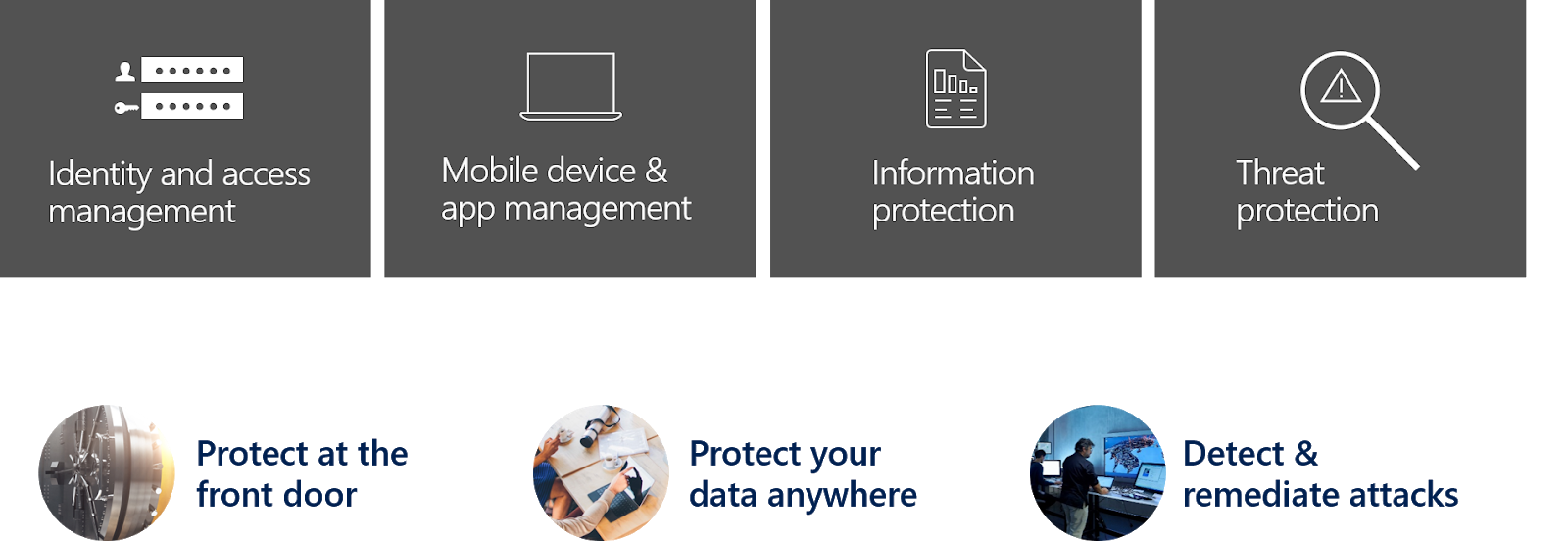
To get a solid Security & Compliance
strategy based on the Microsoft Security Stack the best way is to start with
your scenarios. Dealing with the Microsoft Security Stack a best practices
approach is to separate the topics like this:
Next step is to map the scenarios:
Protect at the front door
Protect your data anywhere
Detect & remediate attacks
to those 4 categories / topics:
Identity and access management
Mobile device & app management
Information protection
Threat protection
Periodic table &
mapping
Microsoft offers a good overview to tweak your
scenarios in this article Top 10 Actions to Secure Your
Environment.
Based on this the following overview offers a blueprint to get started with
your security strategy:
From a
planning and architecture perspective the features and services must be
separated in monitoring solution and solution used to natively setup
regulations and policies.
For example: You can use Information Protection to protect
you content and E-Mails and in addition you can integrate the Logs and Signals coming
from Information Protection to Azure Sentinel. But natively you cannot use
Azure Sentinel to protect you content and E-Mails.
This is
what end-users say about IT-Security. If you are an Admin or Data Security Officer,
you have to think about IT Security.
Microsoft
provides super useful info and material about this topic. In real world scenarios
we often had to find out where to start. And also, for this Microsoft offers a walkthrough:
I put all the stuff together
in a small Excel workbook and extend it with some further licensing info.
All
important information for your IT security strategy is summarized in this Excel.
In column 1 you will find the respective scenario, column 2 gives you an
overview and column 3 the details on the topic. Columns 4 and 5 contain further information and
details on licensing.
In the last
couple of weeks Microsoft release a bunch of new features / versions for Information
Protection and Unified Labeling:
New
features & functions with Microsoft Cloud App Security and Azure Information
Protection
Azure
Information Protection unified labeling client
Update
to Unified labeling
Cloud App Security and
Azure Information Protection
Cloud App
Security and the integration with Azure Information Protection is not new. If
you are already migrated to Office 365 unified sensitivity labels and if you
did not migrate your existing classification labels you need to know: Creating new labels in the Office 365 Security
and Compliance Center, Cloud App Security will only use the preexisting labels
configured in the Azure Information Protection portal.
Integrating
Azure Information Protection into Cloud App Security you get the ability to:
apply
classification labels as a governance action to files that match specific
policies
view
all classified files in a central location
investigate
according to classification level, and quantify exposure of sensitive data over
your cloud applications
create policies to make sure classified files
are being handled properly
This integration is focusing to scenarios like:
Visibility on
sensitive data in managed cloud apps
Compliance / Risk Enforcement
Apply label to
documents in cloud apps repositories
Prevent storage of
highly sensitive documents in the cloud
Sensitive data reporting
in AIP analytics space
Detect anomalous
access
Block download
of sensitive document from specific locations or non-compliant device
Block upload of sensitive documents
You need both a Cloud App Security license and a license for Azure
Information Protection. Then Cloud App Security syncs the labels from Azure
Information Protection. This action is performed every hour.
Scanning the files:
Automatic scan:
all new or modified files are added to the scan queue and will be scanned,
classified and protected
File policy to search
for classification labels: these files are added to the scan queue for
classification labels
After you enable Azure Information Protection on Cloud
App Security, all new files that are added to Office 365 will be scanned and you
can create new policies within Cloud App Security that apply classification
labels automatically.
Unified labeling is not activated per default and Azure
Information Protection labels can be used only by the Azure Information
Protection client. To make labels available in the Office 365 Security &
Compliance Center and to use the unified labeling client you need to Activate that
integration:
Before you
activate unified labeling, check in Office 365 that you don't have labels that
have the same name or display name as your labels in Azure Information
Protection. Note that Azure Information Protection labels will be automatically
renamed so that migration can succeed. Once activated you cannot deactivate
unified labeling for your tenant. Learn
more about the migration process.
Unified labeling: Activated
Depending on
how many labels do you have the updated takes some time. After it is done you can manage your
labels from either the Azure portal or the Office
365 Security & Compliance Center. The labels can be used by the Azure Information
Protection client and by unified labeling clients.
Note: you must use the Publish option after
the migration to make the labels available in the unified labeling clients. Otherwise
the client is showing an error like this:
Azure Rights
Management enables BYOK according to a model that Microsoft calls
customer-managed tenant keys. This requires a customer to create an RSA
2048-bit key in their HSM and then export the key to the HSM in Microsoft's
data center. This RSA key is then used to encrypt the document encryption keys
used by Azure RMS. RSA 2048-bit keys correspond to 112-bit AES keys. This means
that the AES 256-bit encryption provided by Azure RMS is really only 112 bits.
The US government has advised against the use of AES encryption keys below 256
bits.
Overview about the necessary
steps:
Create
an HSM-based Azure Key Vault for a specific Azure region.
Generate
your own key according to your IT policies. This requires e.g. Thales HSM,
smartcards and support software.
Transfer
the key from an HSM in your possession to HSMs owned and managed by Microsoft
as provided by Azure Key Vault for your vault. This process ensures that your
key never leaves the hardware protection boundary.
When
you transfer your key to Microsoft, it remains protected by Thales HSMs.
Microsoft has worked with Thales to ensure that the key cannot be recovered
from Microsoft HSMs, and certificates are provided to ensure this.
Configuring
Azure Information Protection to use the HSM-based key
Azure Key Vault's real-time usage protocols are
available as an option. These can also be applied to BYOK to see exactly how
and when the key is used with Azure Key Vault. Blob storage is required to
store the logs.
BYOK
goes with Office 2019, Office 2016 and Office 2013
If
you first used Azure Information Protection with a client key managed by
Microsoft and now want to manage your client key yourself (BYOK), the
previously protected documents and emails remain accessible via an archived
key.
An
x64 workstation in offline mode with a minimum Windows 7 operating system and
nCipher nShield software version 11.50 or higher.
If
this workstation is running Windows 7, you must install Microsoft .NET
Framework 4.5.
A
workstation that is connected to the Internet, has a Windows 7 or later
operating system, and has Azure PowerShell (version 1.1.0 or later) installed
on it.
A
USB drive or other portable storage device with at least have 16 MB of free
disk space.
If
the key safe that should contain your client key uses virtual network service
endpoints for Azure Key Vault, allow trusted Microsoft services to bypass this
firewall.
The Azure Rights Management administration
module for Windows PowerShell.
Support
for billing and subscription management is provided free of charge.
Technical
support is available through various Azure support models
from €24.456/month for Developer and €84.33/month in the Standard version.
SLA:
Microsoft guarantees that in at least 99.9% of cases, Key Vault transaction
requests will be processed within 5 seconds.
Call to Action
Evaluate
the actual advantages and disadvantages of BYOK in the context of your
requirements and specifications in detail with the data protection officer and
the involved departments.
Calculate
the costs for the implementation, the required services and hardware as well as
the operating costs. Based on this, you create a cost-benefit analysis.
Do
you have other services that are already using BYOK with Azure?Did
you use your own key for other scenarios and therefore want to implement AIP
BYOK as well?
If
you want to protect documents attached to an E-Mail only on the transport layer
or if you want to use the “Do not forward” feature OME is the way to do it.
If
you want to protect the document also after the E-Mail is received and the
document is downloaded etc. then you need AIP.
Bothe features
are good to protect E-Mails and attachments for internal use and for sharing
them with externals. In OME you can send protected E-Mails to external receptions
with out configuring anything special. The recipients received an HTML message
that they downloaded and opened in a browser or downloaded mobile app:
To make the
functionally available with AIP you need to add the external domain to you AIP
label: