Posts mit dem Label Microsoft365 Office365 werden angezeigt. Alle Posts anzeigen

Montag, 4. Mai 2020

Microsoft Teams -The Day After


The main aspect in the context of the current challenge with the COVID-19 situation is that ad hoc solutions are needed to keep companies operational. This includes solutions for homeoffice as well as for meetings with customers and partners.
Regardless of which technical solution is used, at the end of the day the common organizational governance topics come up during the technical planning.

If users can decide individually and independently to create new Teams and channels, invite external users and share content, chaos results.

Who is supposed to organize this again afterwards, and especially, who is supposed to decide which data and which guestuser is still needed?

The fear of this often prevents that Microsoft Teams is used. But in the current situation, solutions and platforms like Microsoft Teams are needed to keep companies and business running.

The Solution

Automated solutions to resolve governance topics such as data chaos, duplicates and orphaned guest accesses are the Azure features around the topics of Identity Governance and Lifecycle Management.

Entitlement Management

Azure AD Entitlement Management is an identity management feature-set that enables organizations to manage identity and access cycles by automating access request workflows, access assignments, reviews and expiration. The following graphic shows an example of the different elements of Azure AD Entitlement Management.
Access Package 1 includes a single Group as a resource. Access is defined with a policy that allows users from a specific Azure AD group to request access.
Access Package 2 includes a Group, an Application and a SharePoint page as resources. Access is defined by two different policies. The first policy allows a group of users in the directory to request access. The second policy allows users from another / external Azure AD to request access.

When an access package is created, we can defines how long the access remains active before it is deactivated again:
An individual access URL is generated for each package. Users then use this to activate the package for themselves:

Access Reviews & Groups Expiration Policies

Azure AD Access Reviews automate the regular review of group memberships, access to enterprise applications and role assignments. This ensures that only those people who need it continue to have access.
Overview:
When an Access Review is created, a user is assigned who must perform the review. This can also be done dynamically based on the Groups / Teams Owner. The reviewer then receives an e-mail that directs him to his upcoming reviews:
The example shows that the first two groups each have only one member and were probably created for test purposes only. The third group has 16 members. Clicking the Begin review button will show the details and the automatically generated recommendations:
Groups Expiration Policies are not shown in the Identity Governance section and must be accessed via Azure AD -> Groups -> Expiration:
Again, the group owner receives a mail in which he must confirm that the Group is still needed. If he does not do it, the Group is automatically deleted. If a Group is deleted, it is "soft-deleted". This means that it can be restored by an administrator for up to 30 days.

Further options

If all this is not sufficient to implement necessary requirements, there are extended possibilities with the features Azure AD Conditional Access and the feature App Management.
Conditional Access controls access to applications based on specific conditions. Conditional access policies are used to implement access control based on the specific context.
Example:
  • Microsoft teams can only be accessed from a company device.
  • E-Mail can be accessed from any device. However, if access is from outside the corporate network, multi-factor authentication is enforced.

App Management (MAM) focuses on compliance with data security policies and data protection requirements as well as actions in case of data loss.
Example:
  • Data from Microsoft Teams is not allowed to be included in the iOS or Android backup.
  • Access with a "jailbroken device" is blocked.

MAM without device registration or MAM-WE (WE=without enrollment) allows IT administrators to manage apps on devices that are not registered in Intune MDM.

Best Practis

At the end, it is not a question of what Azure features and functions are available, but rather what is to be achieved and what exactly the business case looks like. Therefore, start with your scenarios. The second step is then the mapping to the Azure features in order to implement the necessary governance aspects.

Montag, 20. April 2020

Microsoft Teams - technology is one thing, but...


Meanwhile, it is well known that the solution Microsoft Teams for remote and home office is very suitable. In the context of COVID-19, Microsoft has made teams available free of charge until February 2021. How you can use this offer is described in this article: Welcome to Microsoft Teams free.
This means that we now have the prerequisite that we already know from other case studies and from other industries, namely: "People are creative and help themselves". The example of a toy store was in the press in the last weeks - the shop is currently closed; however, customers can phone the owner and order toys. The owner then places the order with the butcher across the street because the butcher is still open.
The depositing of the goods at the butcher across the street and the option to pay by bank transfer is only one aspect of the whole thing. Toys can also be ordered at Amazon and are delivered to your home by the postman. The key point is the individual advice to the customer on the phone before the purchase. And it's the same with online meetings. Whether or not a Teams meeting is successful or not is not dependent on the fact that a free version of the product is now available. Preparation is the key.

Successful online meetings with Microsoft Teams

(Some features not available in the free version)

Before the meeting: Successful meetings require preparation. This is more important in an online meeting because we usually lack feedback channels such as body language etc. or have only limited access to them. Here are a few useful tips:
  • What do you want to achieve in the meeting and what does your customer / partner get out of it?
  • If necessary, prepare alternative options.
  • As you prepare for the meeting, ask yourself: Is what I am offering relevant to my partner / customer? And if not, why not?! And if so, how do I have to communicate it so that my counterpart understands it?
  • Provide information about the attendees, their roles and responsibilities etc. for all participants.
  • Share the agenda and context before people get together. This allows participants to chat and share content before the meeting. This information can then be brought directly into the meeting.
After the meeting: After the meeting, all meeting content is retained for 30 days so that participants can review the meeting, continue the discussion and move forward with their work. You can return to the meeting to use the chat, meeting notes, digital whiteboard, and shared files. Nothing gets lost.

Summary

The technique is one thing. Your preparation for a meeting is the other that makes the difference in the success of an online meeting. This includes knowing the features of Microsoft Teams from the attendee perspective. Of course, the topic Security & Compliance also has an administrative perspective. The following Microsoft article summarizes these aspects: Security and Compliance in Microsoft Teams

Dienstag, 24. März 2020

3 more topics in the context of Microsoft Teams

In the current situation almost no day goes by without new possibilities and options to deal with the challenges around COVID-19.

Here 3 more topics in the context of Microsoft Teams:

  • Microsoft Teams Interactive Demo for end users and users who have not worked with teams until now: http://teamsdemo.office.com/. In this interactive demo, you’ll get a guided tour of Teams to understand the app and learn about key features.


Samstag, 5. Oktober 2019

Microsoft Security Stack - When to use what


When to use what – Azure Sentinel, CASB, Azure Security Center, Security & Compliance Center in Office 365, etc.

Many customers using Microsoft Cloud Services in the context of collaboration und communication often asked the “When to use what” question. Meanwhile we had several really good methods and tools to answer this question like the Periodic Table of Office 365. At the end it is not about when to use what, it is about “what do you want to do” or “what is your business case”? And this is the same with the Microsoft Security Features & Services.

Features & Services

Microsoft Azure Sentinel is a cloud-native SIEM solution with advanced AI and security analysis capabilities.

Microsoft Cloud App Security is a multimode Cloud Access Security Broker (CASB). It provides rich visibility, control over data travel, and sophisticated analytics to identify and combat cyberthreats across all your cloud services. Further infos about CASB

Azure Security Center provides unified security management and advanced threat protection across hybrid cloud workloads.

Office 365 Security & Compliance Center is designed to manage security & compliance features across Office 365. Links to existing SharePoint and Exchange compliance features bring together compliance capabilities across Office 365.

Microsoft Intune is a management solution that provides mobile device, endpoint and operating system management. It aims to provide Unified Endpoint Management for corporate devices and BYOD.

Azure Active Directory (Azure AD) is Microsoft’s cloud-based identity and access management service. It covers resources, such as Microsoft Office 365, the Azure portal, and thousands of other SaaS applications along with any cloud apps developed by your own organization.

Microsoft Information Protection helps an organization to classify and protect its documents and emails by applying labels. It helps you discover, classify, label and protect your sensitive information – wherever it lives or travels. Further infos about Information Protection

Protect your enterprise from threats in the cloud and on-premises with Azure Advanced Threat Protection. ATP is a cloud-based security solution that leverages your on-premises Active Directory signals to identify, detect, and investigate advanced threats, compromised identities, and malicious insider actions directed at your organization.

Microsoft Defender Advanced Threat Protection (ATP) is a unified platform for preventative protection, post-breach detection, automated investigation, and response. Microsoft Defender ATP is built into Windows 10.


Typic discussions with customers

Azure Sentinel vs. Azure Security Center

Azure Security Center is focusing on Azure workloads. Azure Sentinel is used to for real-time event and detecting attacks covering your hole architecture.
Quote by Microsoft: To reduce confusion and simplify the user experience, two of the early SIEM-like features in Security Center, namely investigation flow in security alerts and custom alerts will be removed in the near future. Individual alerts remain in Security center, and there are equivalents for both security alerts and custom alerts in Azure Sentinel. Going forward, Microsoft will continue to invest in both Azure Security Center and Azure Sentinel. Azure Security Center will continue to be the unified infrastructure security management system for cloud security posture management and cloud workload protection. Azure Sentinel will continue to focus on SIEM. Source: Securing the hybrid cloud with Azure Security Center and Azure Sentinel


Azure Security Center vs. Security and Compliance Center in Office 365

The Office 365 Security & Compliance Center is designed to help you manage security & compliance features across Office 365. Links to existing SharePoint and Exchange compliance features bring together compliance capabilities across Office 365. Azure Security Center analyzes data from a variety of Microsoft and also partner solutions. To take advantage of this data, machine learning for threat prevention, detection, and eventually investigation. Both services are part of the Microsoft Service Trust Platform


Azure Sentinel vs. CASB

Azure Sentinel is a SIEM solution with advanced AI and security analysis capabilities. It integrates with third-party security platforms from vendors such as Fortinet, Symantec and Check Point, as well as Microsoft's Graph Security API. By connecting with Microsoft Cloud App Security, you will gain visibility into your cloud apps, get sophisticated analytics to identify and combat cyberthreats, and control how your data travels.


Office 365 Security Features vs. Intune

Microsoft Intune and built-in security features in Office 365 for MDM both give you the ability to manage security & compliance in your environment. You can manage security & compliance using both Intune and Office 365 in the same Office 365 tenant. If you have both options available, you can choose whether you manage security & compliance in Office 365 or the more feature-rich Intune solution for MDM and MAM scenarios.


Azure AD vs. Intune

Intune manages mobile devices and apps. It integrates closely with other EMS components like Azure Active Directory for identity and access control.


Azure Advanced Threat Protection vs. Microsoft Defender ATP

Azure Advanced Threat Protection enables you to integrate Azure ATP with Windows Defender ATP. While Azure ATP monitors the traffic on your domain controllers, Windows Defender ATP monitors your endpoints, together providing a single interface from which you can protect your environment. By integrating Windows Defender ATP into Azure ATP, you can leverage the full power of both services and secure your environment. Source & Details: Integrate Azure ATP with Windows Defender ATP


Roundup

As you can see all this features work together like for example Microsoft Defender Advanced Threat Protection integration with Microsoft Cloud App Security or Azure Information Protection integration with Cloud App Security So trying to find the best tool / solution for your enterprise only discussing the detailed features isn’t the best way.

How to get started

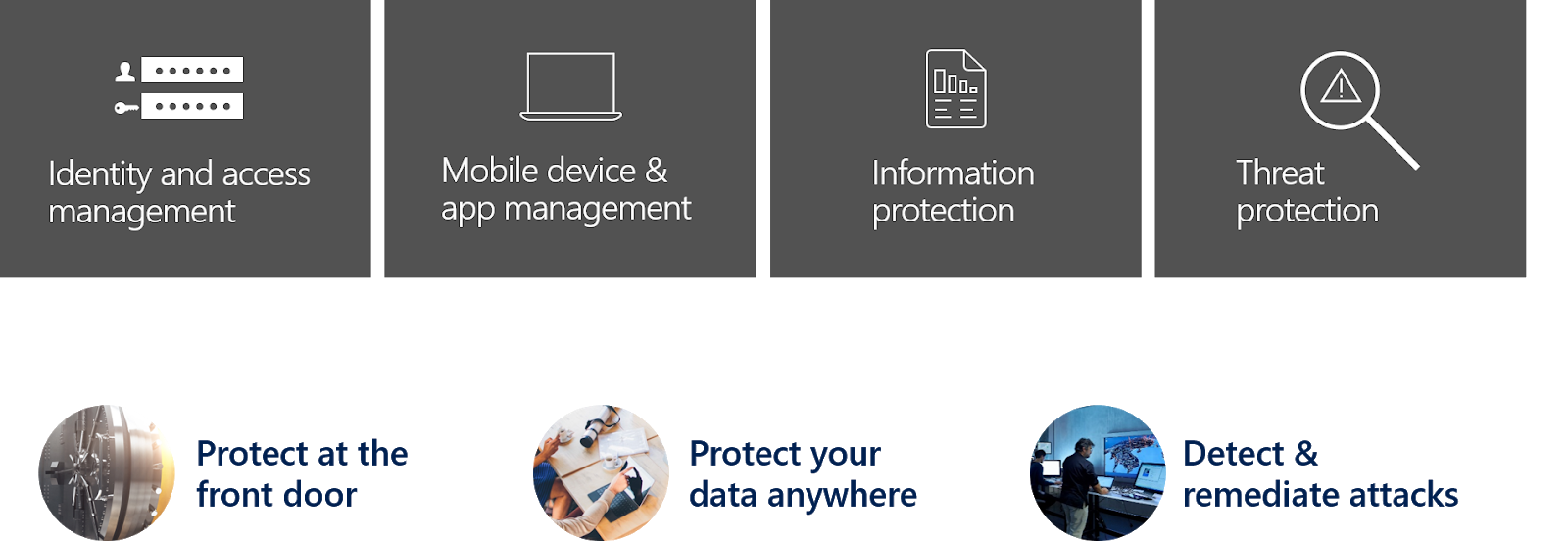
To get a solid Security & Compliance strategy based on the Microsoft Security Stack the best way is to start with your scenarios. Dealing with the Microsoft Security Stack a best practices approach is to separate the topics like this:

Next step is to map the scenarios:
  • Protect at the front door
  • Protect your data anywhere
  • Detect & remediate attacks
to those 4 categories / topics:
  • Identity and access management
  • Mobile device & app management
  • Information protection
  • Threat protection

Periodic table & mapping

Microsoft offers a good overview to tweak your scenarios in this article Top 10 Actions to Secure Your Environment. Based on this the following overview offers a blueprint to get started with your security strategy:

Architecture


Roundup

From a planning and architecture perspective the features and services must be separated in monitoring solution and solution used to natively setup regulations and policies.
For example: You can use Information Protection to protect you content and E-Mails and in addition you can integrate the Logs and Signals coming from Information Protection to Azure Sentinel. But natively you cannot use Azure Sentinel to protect you content and E-Mails.
So at the end it is all about your scenarios!