Samstag, 21. Juni 2014

Project Oslo and the Office Graph – first indications

At this year SPC in Las Vegas, Microsoft introduced codename Oslo and the Office Graph. If you want to see how the product should look watch this YouTube video:

Microsoft is working on the product. The TAB program is about to start and Oslo is now appearing with status "started" on Yammer release Schedule: https://about.yammer.com/success/engage/grow-your-network/release-schedule/
In my Office 365 Tenant belonging to my MSDN Subscription I also found the first indications. I have a look in several other Tenants and can actually not found anything of this. Not sure it´s because of this Tenant is part of an MSDN Subscription.

New result source

Interesting artefact is the new result source: “Local SharePoint Graph”
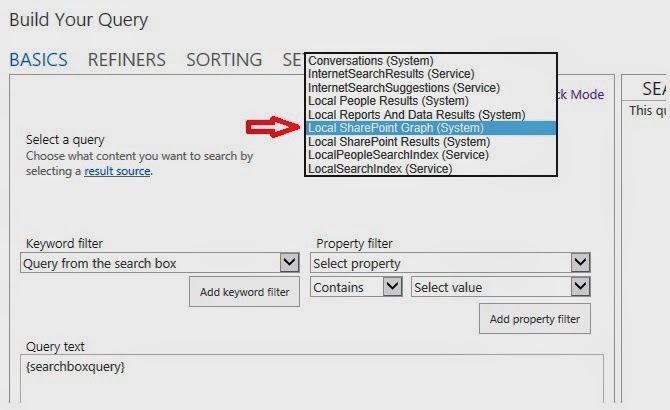
This result source is not shown under SharePoint online administration or in the site settings menu. It’s actually only visible in the Query Builder. Latest news from Microsoft says that the Office Graph gets its own index. We can assume that this new result source is mapped to the new Graph Index. Actually the new result source shows the same results like the “Local SharePoint Results” source.

Stay tuned about upcoming news about Project Oslo & the Office Graph….

Sonntag, 27. April 2014

Chapter 1 - SharePoint 2013 Analytics Feature


First chapter of my tutorial about SharePoint 2013 Analytics Feature is only on itUnity:
Visit us under www.itunity.com                          Follow us on Twitter @itunity01 

Mittwoch, 23. April 2014

Welcome to IT Unity


Welcome to IT Unity!

I am thrilled to share with you the launch of IT Unity , the incredible new site that empowers individuals and organizations to solve business problems with technology. IT Unity is a community of trusted experts, users, business decision makers, IT professionals, developers, and industry solution providers--everyone who works with Microsoft SharePoint and Office 365 (with more technologies to come!)
I invite you to register on ITUnity.com and to participate in our Launch Contest. You'll find a site where we can all come together to
  • CONNECT with world-renowned subject matter experts and peers in community-driven forums. Take advantage of experts' regular office hours and ask the questions. Gain invaluable insight through lively discussion of issues that community members are facing.
  • SHARE how you've solved a problem, created a service or product, or developed expertise. IT Unity's global audience and network of industry relationships will enhance your visibility and the impact you can make on the broader community.
  • DISCOVER how SharePoint, Office 365, and other technologies can drive innovation and business value. Find best practices, guidance, lessons learned and other solutions from experts and organizations that have tackled the challenges you face.
  • DEVELOP your knowledge, your skills, your reputation, and your professional network.
IT Unity revolutionizes the way technical content is created, customized, and consumed, and the way individuals and organizations connect with the guidance, expertise, and solutions they need to achieve their business objectives. 
Today, as we launch, you'll find in-depth content from trusted technical and thought leaders, product and service providers, and exciting new voices in the tech community. You'll discover a new resource for asking questions, and getting answers from experts and peers. You'll can create and join professional networks and communities of practice. And you'll learn about how our contributors have solved real-world problems, by using out-of-box technologies, customizations and extensions, and third-party tools.
We've got big plans for IT Unity. We couldn't be more excited to share this news with you.  Thank you for becoming a part of this CommUNITY!

Visit us under www.itunity.com                          Follow us on Twitter @itunity01 


Montag, 17. März 2014

Rename public facing website O365 greyed out


Drying to rename public facing website in O365 SharePoint Online is greyed out because of there is no more storage available.


Making storage available activates “Rename Website” button:


Sonntag, 9. März 2014

Future of DocPush feature in SharePoint 2013

One of the most missing features in SharePoint Search is the option to push content direct to the index. In FAST ESP we have that functionality. Within FAST for SharePoint 2010 there was a tool called docpush.exe. Using this tool you can push content to the index. But this tool was not designed for productive use. There were several problems around this. For example if you push a document direct to the index using this tool and the crawler catches it also you have duplicates. During SPC14 the information came up that a push functionality for SharePoint 2013 search was already on the roadmap for SP1. Because of some unsolved problems it did not come with SP1. But this means it’s no longer a question if this function is coming – it’s only the question when it comes.

The function is no longer realized in a separate tool like the docpush.exe in FAST for SharePoint 2010. The function would be integrated as part of the SharePoint 2013 Search REST API. So there is a good changes that it also comes for SharePoint online. Locking forward what that all could mean for missing option to create own content sources for SharePoint Online. Stay patient. News are coming up soon.